function myextensionTinyMCE($init) {
    // Command separated string of extended elements
    $ext = 'span[id|name|class|style]';

    // Add to extended_valid_elements if it alreay exists
    if ( isset( $init['extended_valid_elements'] ) ) {
        $init['extended_valid_elements'] .= ',' . $ext;
    } else {
        $init['extended_valid_elements'] = $ext;
    }

    // Super important: return $init!
    return $init;
}

add_filter('tiny_mce_before_init', 'myextensionTinyMCE' );
Kategorie: Snippets
-
WordPress › Support » Prevent span tags from being removed
-
Eigene Taxonomien und ihre Verwaltung
- [Snippet] Adding your custom taxonomy to post/page list in WordPress
- WordPress Mapping URL to a File
- Introducing WordPress 3 Custom Taxonomies
- Using manage_posts_columns in WordPress
- Add Custom Column To WordPress Post Manage Page
- Add a Custom Column in Posts and Custom Post Types Admin Screen
- Adding a Taxonomy Filter to Admin List for a Custom Post Type?
- Expand Your “Edit Category” Admin Panel
- Terms of Custom Taxonomy in a Dropdown Menu
- WordPress Multi-select Custom Taxonomies
- How To Create Custom Taxonomies In WordPress
- Neue Taxonomien anlegen und ausgeben
- Introducing WordPress 3 Custom Taxonomies
- Add columns for custom taxonomies to custom post types in WordPress
- Innovative Uses of WordPress Post Types and Taxonomies
- Add custom post type and taxonomy counts in the Right Now Dashboard widget
- Simple Taxonomy: WordPress 3.1 and up allow for reasonably simple custom taxonomy, this plugin makes it even simpler, removing the need for you to write any code.
- [resolved] custom taxonomies not linking in dashboard
- How to Add Custom Post Types to Your WordPress Dashboard (in the Right Now Widget)
- Add a Custom Column in Posts and Custom Post Types Admin Screen
-
Vorkommen eines Zeichens innerhalb einer Zeichenkette finden
Update 2012-06-18: Eigentlich ist die Lösung, Pierre-Henri sei Dank, über preg_match zu erreichen.
- strrpos() – Findet das letzte Vorkommen eines Zeichens innerhalb einer Zeichenkette
- stripos() – Findet das erste Vorkommen eines Strings, unabhängig von Groß- und Kleinschreibung
- strripos() – Findet das letzte Vorkommen der gesuchten Zeichenkette in einem String, unabhängig von Groß- und Kleinschreibung
- strrchr() – Sucht das letzte Vorkommen eines Zeichens in einem String
- substr() – Gibt einen Teil eines Strings zurück
- stristr() – Wie strstr, aber unabhängig von Groß- bzw. Kleinschreibung
- strstr() – Findet das erste Vorkommen eines Strings
-
10+ Mod_Rewrite Rules You Should Know
- www.noupe.com/php/10-mod_rewrite-rules-you-should-…
- wordpress.org/support/topic/htaccess-12
- trash-wissen.de/2009-07-20/spass-mit-1und1/
- corz.org/serv/tricks/htaccess2.php
- www.webstop-webdesign.de/wissen/ftp-status.htm
- www.theegglestongroup.com/writing/ftp_error_codes….
- www-mice.cs.ucl.ac.uk/multimedia/misc/tcp_ip/8706….
-
Using Filters
Adding and removing functions to/from hooks
# It always works the same when you are adding and moving stuff. you add FUNCTIONS to HOOKS. think of hooks like parking spots. some are empty, some have cars on them. you can move the cars around, etc.
function function_you_want_to_add(){
echo "I heart bacon!";
}
add_action('destination_hook','function_you_want_to_add',$priority# );
Removing stuff works a bit differently:
function remove_stuff(){
remove_action('hook_location','function_you_want_to_remove',$priority# );
}
add_action('init','remove_stuff');
init is just a default wordpress hook. in fact, it is the FIRST one that runs when WP starts whirring.
Using filters
it took me a long time to understand filters. think of filters like this… they are still parked in the same parking spot, but something about the car is different. filters change something w/o moving it.
you can filter anything that says
apply_filters('this_is_the_filter_name', $somevariable);filters take something IN and spit something OUT. send a blue car into the function and it might come out red.
function sample_filter_function($input_from_original){
$send_output_to_filter = $input_from_original . " Add some bacon!";
return $send_output_to_filter;
} add_filter('this_is_the_filter_name','sample_filter_function',$priority#);
Whatever content WAS going to be printed will now have “ Add some bacon!“ tacked on to the end, b/c well.. who couldn’t use more bacon?
Lastly, the $priority# stands for priority number. it is like a traffic cop in the parking lot. or maybe just an orange cone. if more than 1 function wants to be on a particular hook the priority decides which goes first same as if 2 cars want to park in the same spot (sorry, had to beat this metaphor to death). the higher the number the later it gets run. this can be important, but is not always necessary.
Props to @kwight for starting the parking metaphor. Apparently my ball-pit metaphor didn’t make any sense b/c no one knew what a ball-pit was.
-
Tooltip-Skript
/* ******************************************* * * Tooltip * Source: Fat-Man Collective - www.fat-man-collective.com * Coded by Yann Lorber - www.yannlorber.fr * August 2009 * ******************************************* */ if( $("a.screenshot").length ) { xOffset = 210; yOffset = -132; $("a.screenshot").hover(function(e){ var imgurl = $(this).attr("id"); $("body").append("<div id='screenshot'><div id='screenshotBox'><img src='images/"+ imgurl +"' /></div><div class='triangle'></div>"+"</div>"); $("#screenshot").css("top",(e.pageY - xOffset) + "px") .css("left",(e.pageX + yOffset) + "px") .fadeIn("fast"); },function(){ $("#screenshot").remove(); }); $("a.screenshot").mousemove(function(e){ $("#screenshot").css("top",(e.pageY - xOffset) + "px") .css("left",(e.pageX + yOffset) + "px"); }); } -
WordPress: Default post editor text
// Default post editor text // add_filter( 'default_content', 'diww_default_post_content' ); function diww_default_post_content( $content ) { $content = ' // Any stuff you would put into your HTML '; return $content; } -
iFrame-Höhe an dessen Inhalt automatisch anpassen
# 15.08.2008 Hier findet Ihr eine Demo, die in FF, IE6 und 7 einwandfrei funktionieren sollte.
<!DOCTYPE html PUBLIC "-//W3C//DTD XHTML 1.0 Transitional//EN" "http://www.w3.org/TR/xhtml1/DTD/xhtml1-transitional.dtd">
<html xmlns="http://www.w3.org/1999/xhtml">
<head>
<meta http-equiv="Content-Type" content="text/html; charset=utf-8" />
<title>Unbenanntes Dokument</title>
<script type="text/javascript">
  var framefenster = document.getElementsByTagName("iFrame");
  var auto_resize_timer = window.setInterval("autoresize_frames()", 400);
  function autoresize_frames() {
    for (var i = 0; i < framefenster.length; ++i) {
      var framefenster_size = framefenster[i].contentWindow.document.body.offsetHeight;
      if(document.all && !window.opera) {
        framefenster_size = framefenster[i].contentWindow.document.body.scrollHeight;
      }
      framefenster[i].style.height = framefenster_size + 'px';
    }
  }
</script>
</head>

<body>
<iframe src="iframe.html" frameborder="0" style="width:500px; border:1px solid #000"></iframe>
</body>
</html>
Wenn es funktioniert ist unten der Text „Tralalala :D“ zu lesen (ohne das man scrollen muss). Ihr solltet bedenken, dass folgende drei Kriterien erfüllt sein müssen:
- Der Inhalte vom iFrame muss sich auf dem gleichen Server befinden und darf nicht mit einem externen Pfad (beginnt mit http://) aufgerufen werden sondern nur mit einem absoluten oder relativen Pfad
- JavaScript muss aktiviert sein
- Führt man das Script lokal im IE aus, kommt standardmäßig ein Sicherheitshinweis, den man erst bestätigen muss bevor JavaScript ausgeführt wird.
Das Script wurde mehrfach erfolgreich getestet, inklusive in einem kommerziellen CMS.
-
Paths For Building WordPress Themes or Plugins
(Quelle: computeraxe.com/paths-building-wordpress-themes-pl…) When tinkering with the code that runs WordPress it’s very important to get the correct path to a file. Of course it is or else the files can’t be found and your new functionality won’t work.
According to the Codex
In Version 2.6, users were given the ability to move their /wp-content/ directory to anywhere they want, and many users already keep all WordPress files (like /wp-admin/ and /wp-includes/) in an unusual place.
In case you’ve moved the files for your WP installation, you probably have a good handle on paths and how to traverse them. For those who don’t, it can be a hair-pulling experience to find the right path. Once the right path is found, work can continue.
WordPress Paths
To help avoid those DUH! moments, here are some functions and constants that WordPress has defined regarding paths. Once you’re familiar with these functions, writing useful and working code should become easier. Optional parameters may be of use in modifying the output for several of the following templates, including $path, $file or $scheme.
- plugin_basename()
- Usage: plugin_basename(__FILE__); Returns: the name of the plugin and file, such as “myPlugin/myPlugin.php”
- get_theme_root()
- Usage: get_theme_root(); Returns: path to themes directory. No trailing slash.
- get_theme_root_uri()
- Usage: get_theme_root_uri(); Returns: URI for themes directory. No trailing slash.
- get_theme_roots()
- Usage: get_theme_roots(); Returns: Themes directory with a leading slash, like “/themes”.
- site_url()
- Usage: site_url(); Returns: Site directory with no trailing slash.
- admin_url()
- Usage: admin_url(); Returns: Admin directory with trailing slash.
- content_url()
- Usage: content_url(); Returns: Content directory with trailing slash.
- plugins_url()
- Usage: plugins_url(); Returns: Plugins directory with trailing slash.
- includes_url()
- Usage: includes_url(); Returns: Includes directory with trailing slash.
- home_url()
- Usage: home_url(); Returns: Home directory with no trailing slash.
- ABSPATH (constant)
- Usage: ABSPATH. Returns: Home directory with no trailing slash.
- TEMPLATEPATH (constant)
- Usage: TEMPLATEPATH. Returns: Path to current theme with no trailing slash.
There are a few more functions for multisite installations and backwards capability specified in the Codex.
PHP Paths
Some PHP functions worth noting –
- __FILE__ returns the filename of the script that is currently being run
- dirname() returns parent directory’s path for a given filename with no trailing slash
- basename() returns the filename component of path without any parent directories
- getcwd() returns current working directory
Use the functions or constants indicated to build your paths instead of hard-coding them. You’ll save yourself a LOT of trouble when it comes time to move your WordPress installation to a new server or directory.
-
Irgendwas in den WordPress-Seitenkopf einbauen
Folgendes in die functions.php des Themes schreiben:
<?php
//Das hier sagt "Bau irgendwas in den Head ein"
add_action('wp_head', 'irgendwas');
//Und hier wird irgendwas definiert
function irgendwas() { ?>
//irgendwas hier einsetzen
<?php }
?>
Irgendwas ist natürlich durch irgendwas zu ersetzen.
-
Custom Login
<?php // Custom-Login nach Frank Bueltge http://bueltge.de/wordpress-27-login-design-anpassen/846/ // modifiziert nach http://themeshaper.com/forums/topic/bloginfotemplate_directory-returns-the-thematic-directory function gr_custom_login() { echo '<link rel="stylesheet" type="text/css" href="' . 'http://gr-01.de/ci/wp/gr-login.css" />'; } add_action('login_head', 'gr_custom_login'); ?> -
GOOGLE-Analytics-Code ohne Plugin in WordPress einfügen
Die functions.php des aktiven Themes der WordPress-Installation öffnen, in deren Head der Google-Analaytics-Code erscheinen soll. Wenn die Datei noch keine Befehle enthält sieht sie so aus:
[php]<?
?>[/php]Jede PHP-Datei fängt mit „<?“ an und hört mit „?>“ auf. Davor und danach darf nichts, auch kein Leerzeichen stehen. Dazwischen alles. In unserem Fall bauen wir Folgendes ein:
<?

//Das hier sagt "Bau den Google-Analytics-Code in den Head ein"
add_action('wp_head', 'googleanalytics');
//Und das ist der Google-Analytics-Code
function googleanalytics() { ?>
<script type="text/javascript">
var _gaq = _gaq || [];
_gaq.push(['_setAccount', 'UA-1234567-8']);
_gaq.push(['_trackPageview']);
(function() {
var ga = document.createElement('script'); ga.type = 'text/javascript'; ga.async = true;
ga.src = ('https:' == document.location.protocol ? 'https://ssl' : 'http://www') + '.google-analytics.com/ga.js';
var s = document.getElementsByTagName('script')[0]; s.parentNode.insertBefore(ga, s);
})();
</script>
<?php }

?>
Den Platzhalter UA-1234567-8 durch die gültige Web-Property-ID des entsprechenden Google-Analytics-Projekts ersetzen, functions.php speichern und hochladen, fertig.
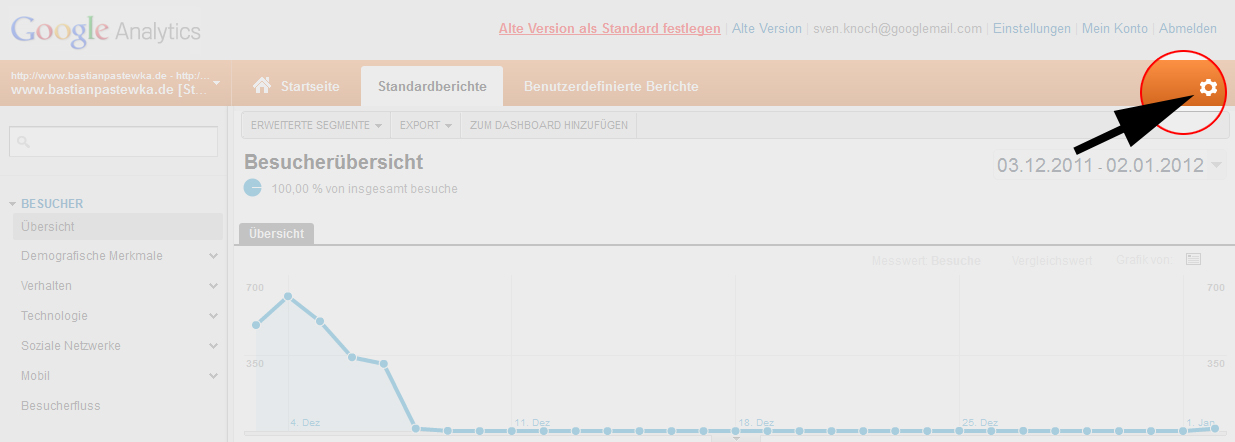
Web-Property-ID unbekannt? In dem Fall Google-Analytics-Konto aufrufen, dort klicken:

In der nun geladenen Seite steht die Web-Property-ID recht weit oben.