Reducing Image Size Generation The Avada theme generates image sizes for the most important areas, so that images of fitting sizes can be loaded on the frontend instead of always loading the full image size. It may seem like a lot of images, but this reduces loading time considerably on the front end for your viewers. We feel the performance increase is well worth the extra image files. If you would like to change this to your needs, please read the information below. How To Reduce Image Size Generation
Blog
-
Avada Documentation – Theme Fusion
-
Übersetzungsbüro Check: Die Anbieter im Vergleich
Übersetzungsbüros im VergleichDie Auswahl des passenden Übersetzungsbüros fällt bei der großen Fülle an Anbietern nicht leicht. Der Übersetzungsmarkt ist stark fragmentiert und wird von einer steigenden Zahl reiner online Anbieter und vielen klassischen, lokalen Übersetzungsdienstleistern bedient. Die einen werben mit der besten Qualität oder den meisten angebotenen Sprachkombinationen, die anderen mit den günstigsten Preisen und der schnellsten Lieferzeit.
-
Gewinnen Sie Ihre eigene Social Media-Kampagne oder die passende Landingpage! – Netzwelten – Versicherungsbote.de
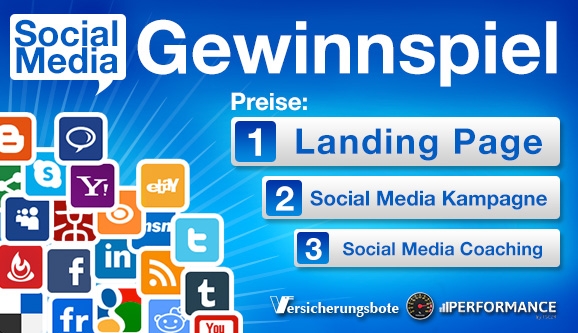 Ihre Preise1. Preis – Ihre persönliche Landingpage: Eine PERFORMANCE-Landingpage zum Produkt Ihrer Wahl mit wählbarer Wunsch-Domain, für ein Jahr bezahlt, wie z.B.: www.gute-geldanlage-2014.info im Wert von 1500 Euro Pressemeldung erstellen, Text, Werbekonzept und DDP Verteiler im Wert von 199 Euro 5 mal 100 Re-Tweets auf Twitter für Ihre Pressemeldung oder Ihren Tweet a 4,00 Euro, insgesamt im Wert von 20 Euro2. Preis – Ihre individuelle Social Media-Kampagne Eine Social Media-Kampagne (aufsetzen) im Wert von 199 Euro Social Media-Coaching zum Netzwerk Ihrer Wahl im Wert von 249 Euro Pressemeldung erstellen, Text, Werbekonzept und DDP Verteiler im Wert von 199 Euro 5 mal 100 Re-Tweets auf Twitter für Ihre Pressemeldung oder Ihren Tweet3. Preis – Wie agiere ich am besten auf Facebook, Twitter, Xing & Co.? – Gewinnen Sie ein Coaching Social Media-Coaching zum Netzwerk Ihrer Wahl (Produkt ID 3.6 bzw 3.7 im Wert von 249 Euro) 5 mal 100 Re-Tweets auf Twitter für Ihre Pressemeldung oder Ihren Tweet
 -
Die Landing Page – Kurze und prägnante Botschaften verhelfen zum Erfolg – Teil 1
 Die Landing Page – Kurze und prägnante Botschaften verhelfen zum Erfolg – Teil 1In Teil 1 unserer 3-teiligen Serie zum Thema Landing Pages erfahren Sie was eine Landing Page ist, worin sie sich von einer normalen Website unterscheidet und welche Ziele mit dem Einsatz einer solchen Zielwebseite erreicht werden sollen. Außerdem erläutern wir Ihnen welche Inhalte auf einer Landing Page zu finden sein sollten und wo welche Inhalte auf der Seite richtig platziert werden.
Quelle: Die Landing Page – Kurze und prägnante Botschaften verhelfen zum Erfolg – Teil 1
-
Stupid WordPress Tricks | Perishable Press
Stupid WordPress Tricks [ WordPress ] One of the most popular articles here at Perishable Press is my January 2005 post, Stupid htaccess Tricks. In that article, I bring together an extensive collection of awesome copy-&-paste HTAccess code snippets. Four years later, people continue to tell me how much they enjoy and use the content as a bookmarked reference for many of their HTAccess needs. The article was even published in a book on Joomla! Security.
-
Wie Facebook mit Ihren Daten Geld verdient | c’t
Torsten KleinzDie Milliarden-MaschineWie Facebook mit Ihren Daten Geld verdientMit über 900 Millionen Mitgliedern ist Facebook Marktführer bei sozialen Netzwerken. Doch die Plattform ist auch ein Milliardengeschäft, das von den Daten seiner Nutzer angetrieben wird. Sie ermöglichen es Facebook, seine eigentliche Ware an zahlende Kundschaft zu verkaufen: attraktive Werbeplätze.
-
Alles über Instagram – wie ihr die Foto Sharing App nutzt
Alles über Instagram – was auf Köln Format bisher geschahHier erfahrt ihr alles über Instagram! Instagram und die Iphoneografie haben sich zu einer meiner großen Leidenschaften entwickelt und ich veröffentliche immer mehr Posts hier im Blog rund um dieses Thema. Zur besseren Übersicht fasse ich auf dieser Seite jetzt alle Beiträge zusammen und werde natürlich auch die zukünftigen hier verlinken. Weiter unten findet ihr auch eine Zusammenfassung all meiner Reisen, die ich bisher mit meinen Handyfotos dokumentiert und hier im Blog veröffentlicht habe.
Quelle: Alles über Instagram – wie ihr die Foto Sharing App nutzt
-
Creating an Advanced Attachment Page in WordPress – WPMU DEV
Creating an Advanced Attachment Page in WordPress
Images are often used to make posts more welcoming and to help illustrate a point, but despite their widespread use the attachment page is sadly overlooked.
via Creating an Advanced Attachment Page in WordPress – WPMU DEV.
-
Self Hosted Videos in Avada
Das ist der Code zum Video-einbetten:
<video src="<videoname-mit-pfad>.mp4" poster="<videoname-mit-pfad>.jpg" controls="controls" width="100%" height="auto"></video>
Der Code ist seit Carsten van Ryssen bewährt und führt auch dazu, dass vom Dektoprechner übers iPhione bis zum Handheld überall ein Video gestartet werden kann, ABER bei Avada ist zu beachten:
- Die mp4-Quelle muss mit „src=“ aufgerufen werden, nicht mit „mp4=“
- Eines darf man nicht in die Spezifikationen reinschreiben, wenn nicht bei Avada die Zitate nicht laufen sollen:
preload="none"Das stoppt den Ladeprozess nicht nur des Videos sondern auch von allem anderen in der Avada-Seite und so werden beispielsweise die videohinterlegten Zitat-Einschübe bei Johnny nicht geladen.
-
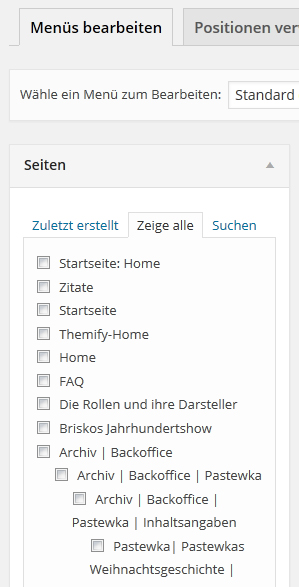 Wenn man viele (hunderte) Seiten hat von denen nur eine auswahl in die Navi soll, dann stört es, dass WordPress die Seiten im Reiter paginiert. An folgender Stelle kann man die Anzahl der Items hochstellen, vor der paginiert wird:
wp-admin/includes/nav-menu.php Zeile 618
Danach werden alle Seiten geladen und über die Browsersuche können die benötigten Seiten für die Navi eingesammelt werden.
-
Unable to Click in Avada Theme Fusion Builder?
# „I’ve just updated my wp to 4.1 and installed avada theme. Im not able to use my mouse to click in the fusion builder, but am able to use my keyboard, eg using tab and typing. Can anyone help me to resolve this problem? I have no problem using my mouse in my other wp site.“ – „I just fixed it on a site. Here’s the answer from the theme-fusion.com support forum: Change the value of the line 1126 in file: wp-content/plugins/fusion-core/admin/page-builder/assets/css/application.css from: z-index: 1001 !important; to: z-index: 999 !important;“ – „The fix above did not solve the problem.“ – „Solution is to upgrade to Avada there version 3.71 or later – see Themefusion support.“
-
Throwback Thursday Definition
Definition:
Throwback Thursday is the name of a weekly social media posting theme that users participate in as part of a very general „throwback“ activity for posting content. In this case, the „throwback“ theme can pertain to basically anything that happened in the past.
On Thursdays, anyone can participate in the Throwback Thursday trend by posting content (usually a photo) on social networking sites like Instagram, Twitter, Tumblr or Facebook to remember a past event. Photos can be from years ago or from just a few days ago. There aren’t really any limitations, and even though it can be fun to participate, it really just gives people an excuse to post more.
Throwback Thursday is very popular on Instagram, and users often tag their photos with a variety of hashtags like #TBT, #ThrowbackThursday or just simply #Throwback. Adding these hashtags can help get photos more exposure from a wider audience of people who are searching through those tags.
Unfortunately, a lot of users on Instagram take advantage of the popular #TBT hashtags and fill them with spam or unrelated content in hopes of gaining more likes and followers. Just go ahead and search through the content posted in the #TBT or #ThrowbackThursday hashtags on Instagram and you’ll be bound to stumble across tons posts that have nothing to do with the theme.
The trend is quickly catching on to other social networks too — especially ones that use hashtag functionality — like Twitter and Facebook. Businesses and brands have also begun using it as part of their social media marketing and community building strategies.
Why Is Throwback Thursday So Popular?
People love the feeling of nostalgia. That’s really all there is to it.
Social media is used for sharing our lives often as it’s happening, but we’ll take any excuse to reminisce about the old days and the good feelings that come with it. A strong emotional response acts as a catalyst for social sharing, so it makes sense that your most beloved memories of the past are among the things you love to share the most — even if it only matters to you, and nobody else.
What to Post on Throwback Thursday
You don’t have to be a social media superstar or have thousands of followers to get in on this trend. All you need to do find something about the past to post about, and tag with #ThrowbackThursday, #Throwback or #TBT.
Old photos of you from your childhood. This is a big trend and it’s something that everyone can do. If you’re an adult, you probably have at least a few fond memories of being a kid, so post an old photo that brings back some good memories and tag it.
An old song that takes you back in time. Photos are the most popular content to share for this trend, but songs are not far behind. People love to share songs from decades ago that evoke a strong sense of nostalgia. Post a screenshot of what you’re listening to or just simply share the link to the song itself.
Screenshots of old Facebook status updates or tweets. Here’s a new one. Social media has been around long enough that we can now look back on some of crazy things we used to post online all those years ago. Timehop is a great tool for checking out what you posted a year ago.
Throwback Thursday Continued: Flashback Friday
Social media users apparently love this trend so much and can’t get enough of it once a week that they decided to extend it into Friday. Flashback Friday is the equivalent of Throwback Thursday — but meant to be posted on with the accompanying #FlasbackFriday (or #FBF) hashtag on Fridays.
Weekday Hashtag Games for Every Day of the Week
Believe it or not, there’s a hashtag theme trend just like #TBT for every day of the week. Although they’re not quite as popular, they still give you a great excuse to find more content ideas and post way more often.
Check out this weekday Instagram hashtag article to find out what hashtag themes you can play around with from Monday to Friday, and even on weekends.
-
A semi-transparent header …
# … can be obtained with this additional CSS code:
.header-v1 {

background-color: rgba(51, 51, 51, 0.7);

top: 0;

left: 0;

width: 100%;

height: 100%;

}
-
WordPress bei Strato installieren
Datenbank anlegen
- Bei Strato.de einloggen. (Kundenlogin)
- Einstellungen -> Datenbankverwaltung auf “Datenbank anlegen” klicken.
- Es erscheint eine kleine Tabelle, die man sich notieren sollte.
- Das erste ist der Name der Datenbank, fängt mit “DB” an und hat eine sechsstellige Zahl dahinter.
- Das zweite ist die MySQL-Versionsnummer, die für die WordPress Installation nicht benötigt wird.
- Das dritte ist wieder interessant, denn das ist der Benutzername für die Datenbank. Er fängt mit “U” an und ist ansonsten identisch mit dem Datenbanknamen (also eine sechsstellige Zahl).
- Jetzt klickt man auf den blauen Passwortbutton, gibt auf der nächsten Seite ein Passwort ein, was man gleich nochmal wiederholen darf.
- Auf “Passwort setzen” klicken und man hat seine Datenbank eingerichtet und wenn der Button “weiter” erscheint können wir Strato verlassen.
WordPress vorbereiten
- Download von WordPress.
- Entpacken und auf den Server hochladen.
- Eine Kopie von wp-config-sample.php machen, diese dann in wp-config.php umbenennen und mit einem einfachen (nicht Word!) Texteditor öffnen. Notepad zum Beispiel.
Wir suchen uns nun die folgenden Zeilen
// ** MySQL settings ** //
define('DB_NAME', 'wordpress');     // The name of the database
define('DB_USER', 'username');     // Your MySQL username
define('DB_PASSWORD', 'password'); // ...and password
define('DB_HOST', 'localhost');     // 99% chance you won't need to change this value
und schreiben die Die Daten von Strato hinein.
Hinweis:
Statt ‘localhost’ trägt man bei allen Strato-Standard-Accounts ‘rdbms.strato.de’ ein.
Das ganze sieht dann etwa so aus:
Die kleinen xxxxxx stehen für die Zahlenwerte.
// ** MySQL settings ** //
define('DB_NAME', 'DBxxxxxx');     // The name of the database
define('DB_USER', 'Uxxxxxx');     // Your MySQL username
define('DB_PASSWORD', 'daspasswort'); // ...and password
define('DB_HOST', 'rdbms.strato.de');     // 99% chance you won't need to change this value
Jetzt das ganze auf den Server hochladen und online den Weg zu wp-admin/install.php suchen.
(Wenn es an dieser Stelle zu knifflig wird, hat hier eine ausführlichere Anleitung).
Typisches Problem: Blödsinnigerweise suchen die Server von Strato nicht automatisch eine index.php, wenn sie keine index.html finden und darum muß man eine .htaccess Datei mit dem inhalt DirectoryIndex index.php einrichten.
.htaccess Datei herstellen
Wir nehmen uns wieder dieses einfache Textprogramm (nicht Word!) und schreiben in eine leere Seite
<strong>DirectoryIndex index.php</strong>
hinein und speichern sie unter dem Namen .htaccess ab. (Punkt vornedran nicht vergessen.) Windows-Nutzer geben als Dateinamen “.htaccess” (mit Anfuehrungszeichen) im “Speichern Unter”-Dialog an. Die .htaccess Datei muß dann im gleichen Ordner liegen, wie die index.php.